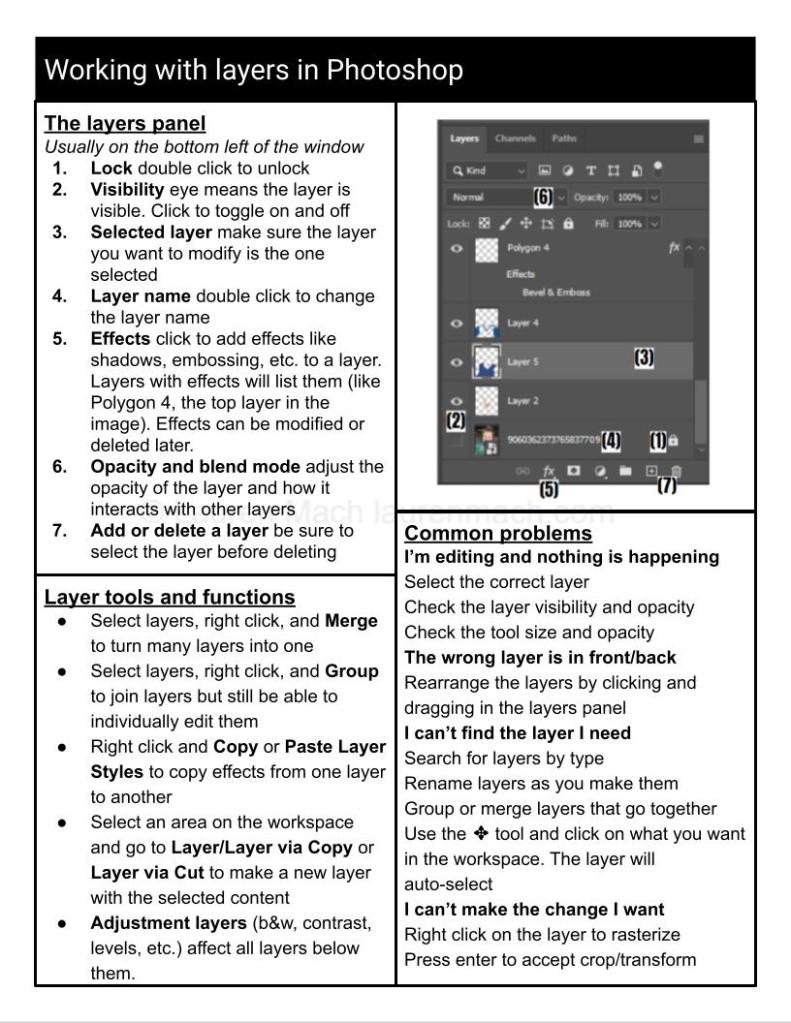
I teach classes in graphic design and photo editing to a variety of audiences, including middle school electives, community center classes, and courses at private retreat centers. As part of my courses, I provide custom-designed cheat sheets. These cheat sheets serve as an outline and reminder of the individual class sessions as well as instructions and troubleshooting for independent work.
Some critical elements of the design of my particular cheat sheets:
- Black and white for cheap, accessible copying and printing
- Consistent formatting across a library of cheat sheets for ease of use
- One side of one page for each class/topic
- Sheets can be printed double-sided to save ink and offer a preview or review of another session
- Large, high-contrast print to make finding and reading information easy
- Hierarchy formatting (bold, bullets, numbered lists, italics) to fit the maximum amount of information while still being readable
- Digital versions are PDFs that work with screen readers and other accessibility technology
Subject areas include:
- Photo editing decision guide (software guide, file types, editing process)
- Removing unwanted items from photos
- Working with layers
- Image size, type, enhancement, and quality
- Brushes and toolbars
- Masking
- Editing in Pixlr (free software)
- Editing in Photoshop
 Lauren Mach
Leave a comment